
Rogue Blight Controls
Mouse-aimed swings, stamina dodge, potion swap on X, and full controller support.
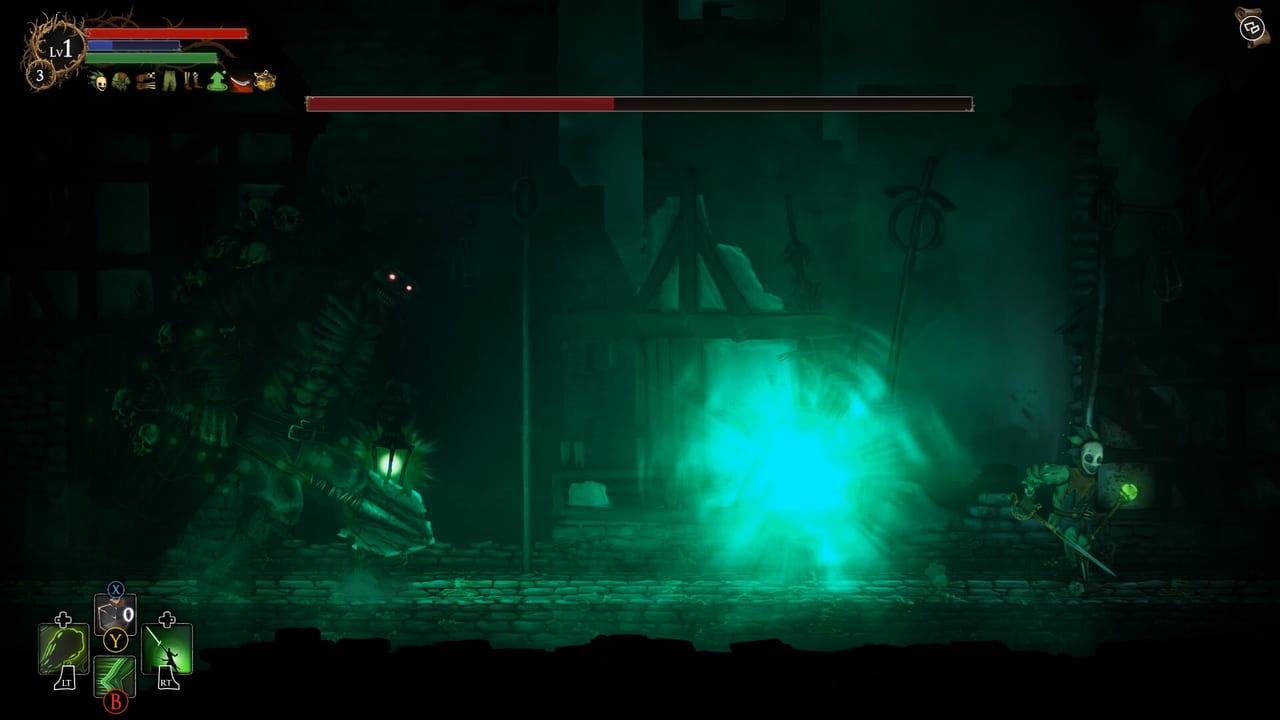
Rogue Blight is built for keyboard and mouse or a gamepad. Steam lists full controller support, Xbox controller compatibility, a keyboard-only option, and save-anytime accessibility. This page is launch-week input guidance from official Steam features, the in-game tutorial, and public footage. CodeRadGames has not published a complete keybind table in the store copy, so exact letter keys other than the documented potion swap can differ after a rebind. Check the in-game settings screen on your build.
If you have not started a run yet, pair this page with getting started. If you already understand the buttons and still die to the first elite, the problem is usually stamina and spacing — that is combat, not a missing hotkey.
Keyboard and mouse
The expected keyboard layout is a 2D side-scroller: move on the ground, jump, dodge, attack, and fire each hand’s skill. Public footage repeatedly shows:
- Movement along the arena floor.
- A tap jump and a held jump for extra height, including air attacks.
- A stamina dodge with invincibility frames while the dash plays.
- A basic attack that spends stamina.
- Left-hand skill and right-hand skill, which spend mana.
- A potion drink.
- X to swap which potion is armed: health or mana.
- Inventory and equipment access outside combat.
Do not treat the mouse as decoration. In footage, cursor position aims both the swing arc and the skill direction. A wooden-sword Berserk or a dagger Dashing Thrust that fires the wrong way is usually a mouse problem, not a damage problem. If you came from a locked 2D brawler, spend two minutes in the tutorial grave swinging at the camera corners until the blade follows the cursor.
Steam also lists a keyboard-only option. That matters if you cannot use a mouse; it does not remove stamina, and it does not auto-aim swings for you. Bind potion swap somewhere you can hit without taking your movement hand off the keyboard.
Mouse-aimed swings
Mouse aim is the control quirk that makes Rogue Blight feel closer to a 2D souls game than to a beat-em-up. You are not locked to left/right facing in the same way a classic sidescroller is. Footage shows players redirecting a slash into a leaping enemy, aiming a skill through a boss, and missing entirely because the cursor sat behind them.
Practical habits from those clips:
- Park the cursor on the enemy’s torso, not on your character.
- When you dodge through an attack, flick the cursor to the new side before you swing. The next slash will follow the mouse, not the last facing.
- Aim skills on purpose. Rising Slash, Dashing Thrust, and wand shots all inherit direction.
- If you use a shield in the left hand, footage showed defend direction following aim as well. Block the incoming arc, not a default left-facing pose.
If your swings keep whiffing on a tall boss such as Gorilla or Wendigo, look at the cursor before you look at the weapon tooltip. Bosses will not save a mis-aimed Berserk.
Controller layout
Steam lists full controller support and Xbox controllers. Demo footage using a PlayStation pad still showed Xbox-style button glyphs, so do not assume the on-screen letters match the plastic in your hands. Typical gamepad mapping from those sessions:
- Left stick moves.
- Face button or bumpers handle attack, jump, dodge, and potion drink — confirm on your prompt overlay.
- Right stick or aim equivalent steers defend direction when a shield is equipped.
- D-pad down appeared as the potion-swap control in at least one recorded controller session (keyboard uses X).
- Shoulder buttons fire left and right weapon skills.
Demo Patch 1.11 enabled Steam Input by default for all controller types except Xbox, after players reported broken pads. Demo Patch 1.17 set the default controller potion-swap button to X so D-pad Down could stay a menu key. Demo Patch 1.10 fixed Steam Deck D-pad in menus. A launch-week Steam discussion reported shield facing ignoring the right stick on some pads (mouse directional combat turned off). Treat that as a community report until CodeRadGames posts a 1.0 hotfix — rebind, try Steam Input on or off, and check the pause-menu input settings added in 1.17.
Dodge still costs stamina on a pad. Invincibility frames still live inside the dash, not in a panic mash. If you hold dodge, you will still run the bar to empty and eat the next hit. Play the tutorial on the pad you will use for the full run; mixing keyboard tutorial habits with a later controller swap is how people forget potion swap exists.
Stamina, dodge, and jump
Stamina is the real control limiter. Attacks and dodges spend it. Jumping is free in the footage relative to the stamina bar, which tempts people to hop instead of dodge. Hopping does not grant the dash invincibility. Use jump to change height for an air swing or to stay on a tall hurtbox; use dodge to pass through an attack.
A short, readable loop:
- Let the enemy start a string.
- Dodge through or away while stamina still has a chunk left.
- Swing while they recover.
- Stop swinging before the bar hits zero so you can dodge the follow-up.
If you empty stamina on a four-hit wooden-sword combo, you did not “play aggressive.” You deleted your only defense. Combat goes deeper on spacing; this page only needs you to feel the bar in your hands.
Potions and the X swap
You carry two flasks: health and mana. X swaps which one the drink button will use. That is the one keyboard binding public footage and this wiki will state without hedging. Skills cost mana. Some parries in footage also cost mana (the parrying dagger skill showed a 10 mana cost on its tooltip). Drinking the wrong flask in a panic is a common first-hour death.
Habits that survive launch week:
- Swap to mana before a skill you plan to open with, such as Berserk.
- Swap to health only after you have already dodged, not during a wind-up.
- Do not drink mana at 90% if the next node is a shop and you still have a full skill cooldown; save the flask for the fight that needs it.
- Controller players should find the documented D-pad swap and rest a thumb there. Keyboard players should not bury X under movement.
Bonfires and some unknown events refill flasks. The drink button does not.
Inventory and equipment
Open the bag between nodes, not in a duel. Footage showed the equipment screen locked during combat. That is a control constraint as much as a UI one: you will not swap a bleeding dagger onto the right hand mid-combo. Plan the pair at the chest, shop, or blacksmith, then walk in.
Slots visible in footage:
- Two weapon hands. Shields are left hand only (Steam copy).
- Armor pieces that render on the character: helmet, chest, arms, pants, boots.
- Potion slot with the X swap.
Demo players described extra weapon slots as a Funguy purchase. Until you buy those, you are choosing a pair, not a toolbox. Drop junk at the blacksmith instead of trying to hot-swap five swords in a Gorilla arena.
You can swap which weapon sits in which hand at a rest point. Putting the parrying dagger on the hand whose skill button you actually press is a controls issue, not a build theory issue. See weapons and builds once the buttons are comfortable.
Steam Deck and handheld notes
Steam currently lists Steam Deck compatibility as Unknown at launch. That is not the same as “unsupported,” and it is not a verified Great rating. What Steam does list: full controller support, Xbox controllers, and a keyboard-only option. The official site described the demo as Deck-compatible during development.
Practical launch-week advice:
- Use the gamepad layout. Mouse aim on a trackpad is possible but worse than a right stick for defend direction and swing facing.
- Confirm potion swap on the Deck D-pad or a rear button. X on a software keyboard is not a combat bind.
- Glyphs may show Xbox labels. Map by function (dodge, skill left, skill right, drink, swap), not by letter.
- If the Deck sleep-wakes into a fight, remember save-anytime is listed as an accessibility feature — pause before you pocket the device.
If handheld play feels muddy, plug a controller into the PC build and learn the fight there, then return. The getting started first-run plan does not change on a Deck; only the thumbs do.
Spend ten minutes in the tutorial grave on the device you will actually use. Bind potion swap, both skills, dodge, and drink so none of them share a panic finger. Then go take a real hit in Waywood Forest.
Frequently Asked Questions
Quick answers to the most common questions.
Does mouse aim actually change attacks in Rogue Blight?
Yes. Public footage shows the cursor steering swing direction and skill direction, including dagger thrusts and wand shots. Park the cursor on the enemy, not on your rogue.
What does the X key do?
X swaps your armed potion between health and mana. The drink button then uses whichever flask is selected. Controller footage used D-pad down for the same swap.
Is there a universal parry button?
No. Parry is a weapon skill, documented most clearly on the parrying dagger (deflect to stagger). It spent mana in footage. See combat and weapons and builds.
Can I open inventory during a fight?
Footage showed the equipment screen locked in combat. Swap weapons and armor at nodes, shops, and the blacksmith, then commit to the pair.
Does Rogue Blight work on Steam Deck?
Steam lists Deck compatibility as Unknown at launch, with full controller support and a keyboard-only option. Use a gamepad layout and bind potion swap to a physical button.
Should I learn on keyboard or controller?
Whichever you will use for bosses. Steam lists both. Mixing a keyboard tutorial with a later pad run is how people forget the potion swap. Then read combat.